Changelog
1.94.0.0 2026-09-21
- Custom Fields is now also available in the German language
1.92.6.0 2026-09-03
- Applied a fix for the Custom Fields Page Visibility page.
1.92.4.0 2026-08-18
- Precedence of notifications for the "Free" subscription over notifications about subscriptions for the other products.
- Change: Setup pages can now not be opened in Business Central Production environments until a Free (or other) subscription is started.
1.92.0.0 2026-07-21
Important
To use the free functionality of the extension in a Business Central Production environment a subscription for the Custom Fields Free product is now required.
You can test out all features without a subscription in a Business Central Sandbox environment.
-
A Free subscription is now mandatory in Business Central Production environments to use the free functionality.
To start a free subscription, search for and open the Apportunix Subscriptions page in your Business Central Production environment. See also the License Activation section of the user manual.
-
Fix for message when using custom field with initial value in sales documents
- Added support for Copy to Purchase Line from Purchase Header, which can be configured on the Custom Fields Definitions page.
1.90.0.0 2026-06-23
- Added Custom Fields on Assembly BOMs, Quotes and Orders
- Fix for Decimal Places for Format Type = Default
1.88.0.0 2026-05-15
Requires Business Central 27.0
Add Definitions with Copilot/AI
It is now possible to describe in natural language which fields, tiles and headlines you want to generate corresponding definitions for.
-
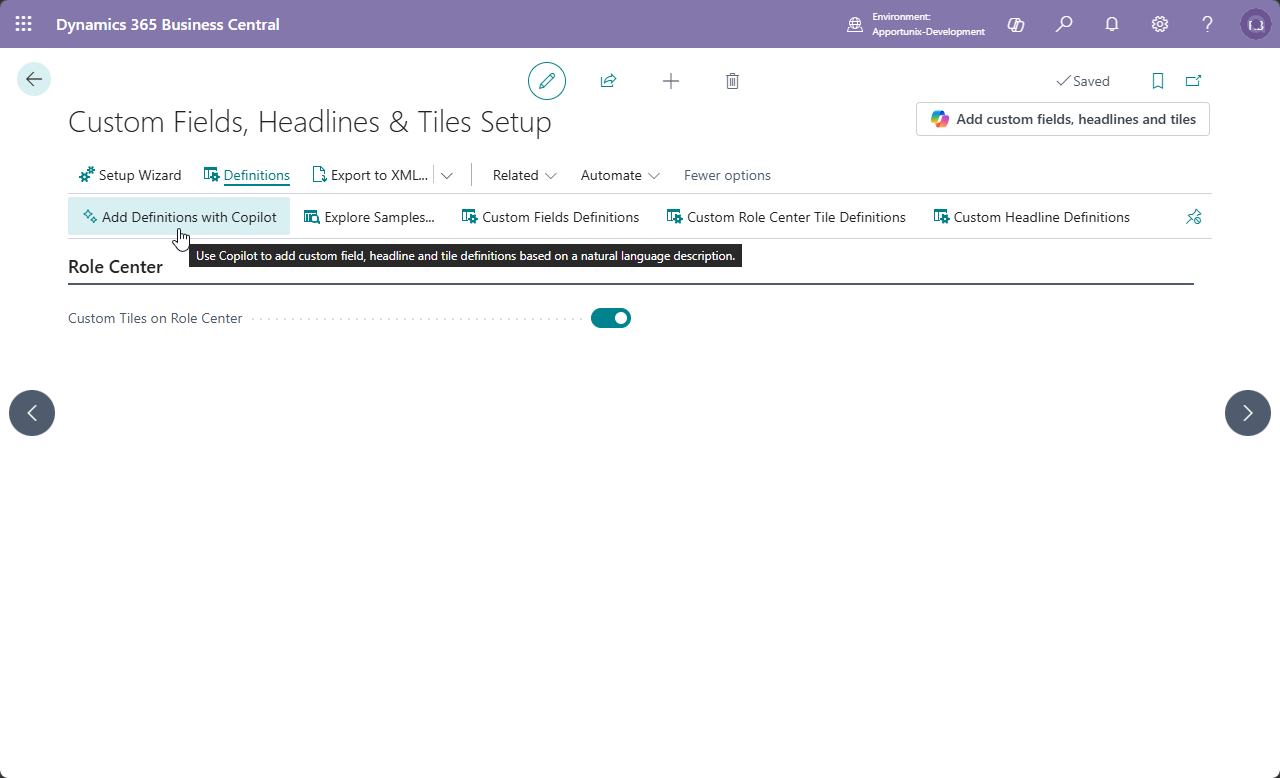
The Custom Fields, Headlines & Tiles Setup page has a new Add Definitions with Copilot action.
This opens a Prompt Dialog page, where a user can enter a prompt to describe which fields, tiles and/or headlines they want in natural language.
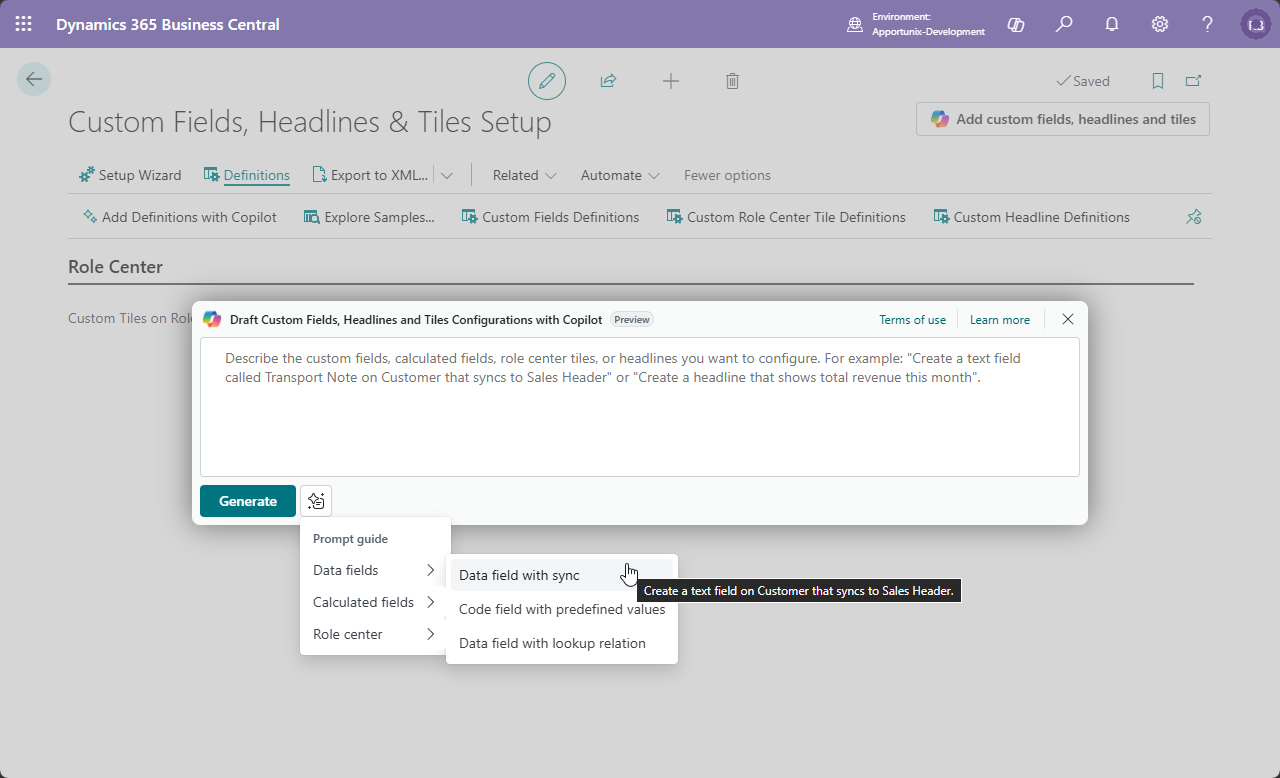
The Prompt Dialog page also has some examples to give insights into which kind of prompts you could use.
-
The Custom Fields Definitions, Custom Role Center Tile Definitions and Custom Headline Definitions pages also have a new Copilot action which open the same prompt dialog page:
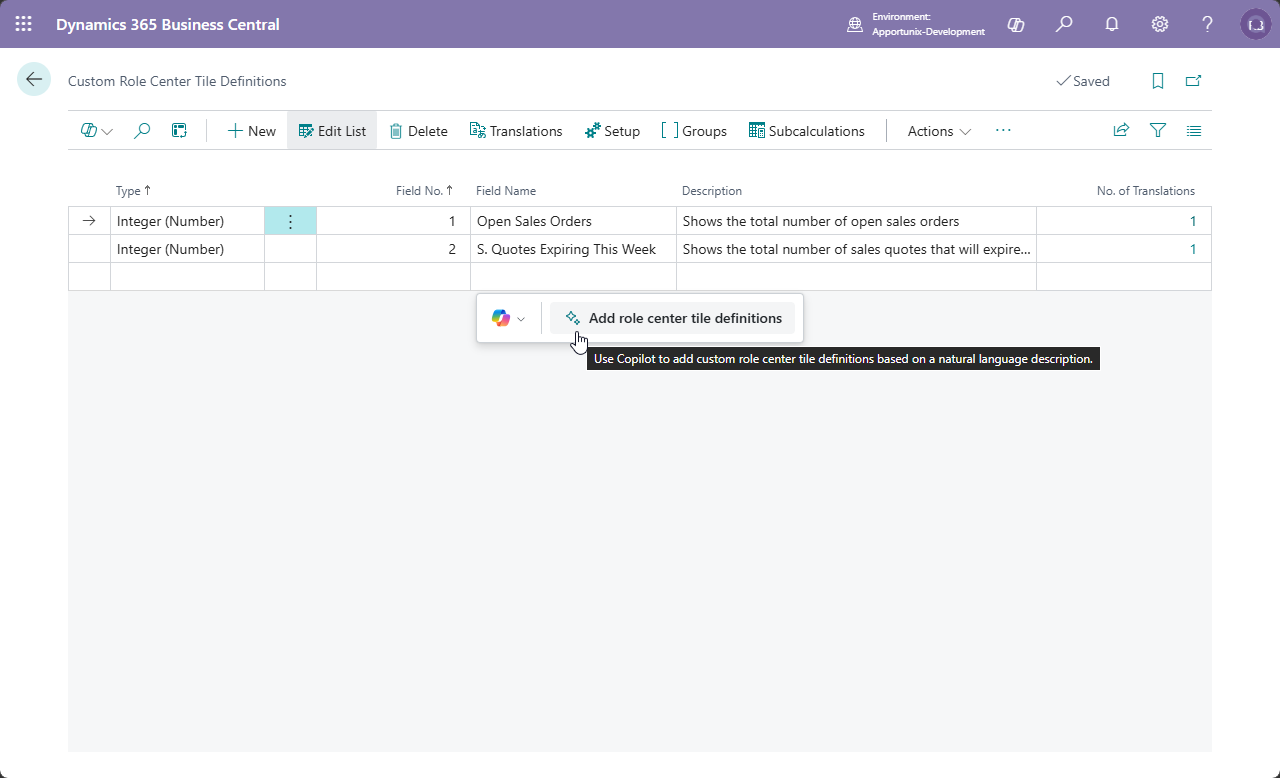
Prompts can also be in different languages, but Copilot will automatically be instructed to make the definitions in English (and add translations for the user’s current language).
Please note that the use of this feature is subject to the Microsoft Copilot licensing and requires Copilot credits (some of which may be automatically available with your Microsoft licenses). When there are insufficient credits left, an error message will appear when you try to invoke the Generate action (just like for any other Microsoft Copilot-dependent functionality).
Explore and Apply Sample Packages
The Custom Fields, Headlines & Tiles Setup and Custom Fields, Headlines & Tiles Setup Wizard pages have a new Explore Samples… action which allows you to explore sample definitions that you can download and/or directly apply.
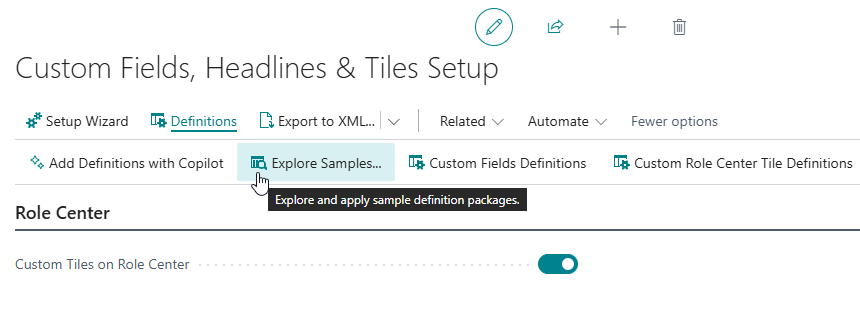
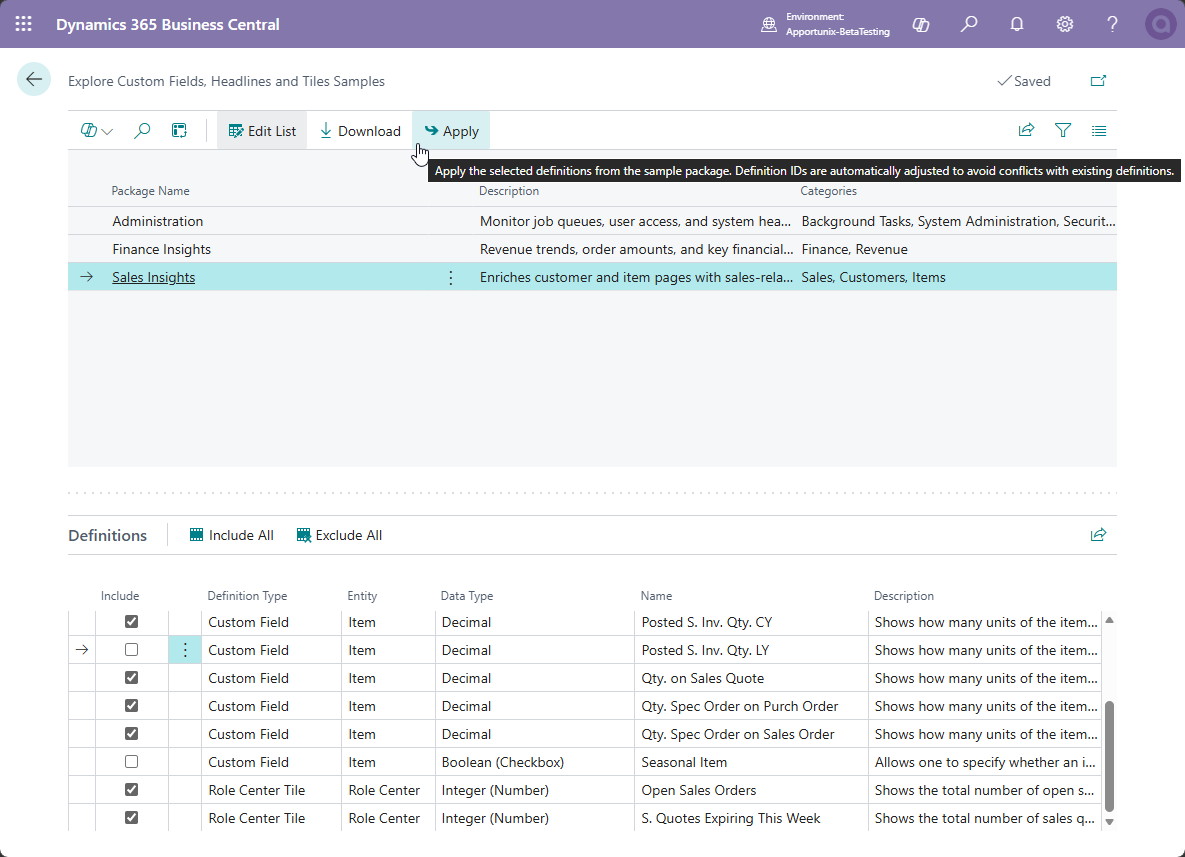
From a package you can select and/or deselect definitions that you would like to apply (and there is also a convenient Include All and Exclude All action to more easily change the selection).
Max and Min with Different Aggregation Field
For the Max and Min calculation types you can now use an Aggregation Field different from the Value Field.
This allows one to achieve a definition like, for example, “The Description of the Item record with the largest Unit Price”. In this example, Description is the output value, while Unit Price is the field that is used to determine the record that has the maximum/minimum value.
Drill Down Hyperlink
The Drill Down Behaviour setting for calculations now has a new Hyperlink option. When this is selected, you can provide a Web URL that will be opened when someone clicks on the calculated field/tile.
The Web URL can contain a placeholder %1.
When this placeholder is used in the URL it will be substituted with the calculated value.
This can be useful, for example, when you want to navigate to an item's webshop page.
Unfiltered Setting
It is no longer mandatory to specify a Filter Set for a calculation.
If you want to aggregate over all records in a table, then you can now set the new Unfiltered setting to TRUE.
Copy as Subcalculation Action
You can now copy a calculated field/tile definition as a new Subcalculation record using the new Copy as Subcalculation action on the definition card page.
Filter with FlowFilter Values
You can now use a FlowFilter fields as the value to filter on.
1.86.2.0 2026-05-04
- Fixed
Microsoft.Dynamics.Nav.Runtime.NavVariant variable not initialized.error that could occur when posting a document with a calculated field to a posted document table with a normal field for which the calculated value is blank. - The Custom Lookup Setup's new Validate setting was missing in the Export/Import functionality. This has been fixed.
1.86.0.0 2026-04-10
Initial Value Setting
The Initial Value setting on the Custom Fields Definitions page allows you to set up an initial value that is used for custom fields when a new record is created.
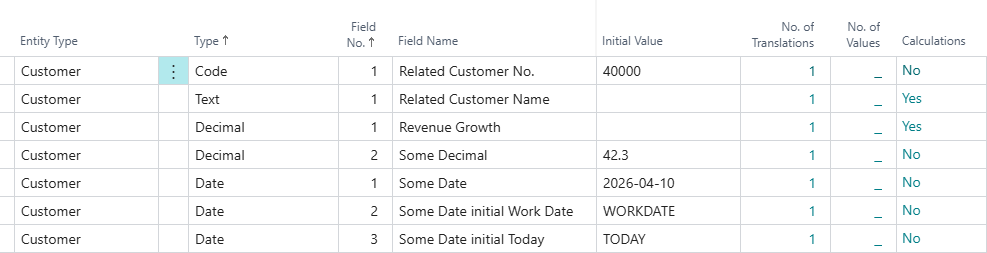
You can also use (filter) tokens, e.g., use WORKDATE as the Initial Value field value to have the custom date field value of new records get initialized with the user's work date.
Please note that this new setting requires the Custom Fields Pro subscription.
Code Field Relation Validation
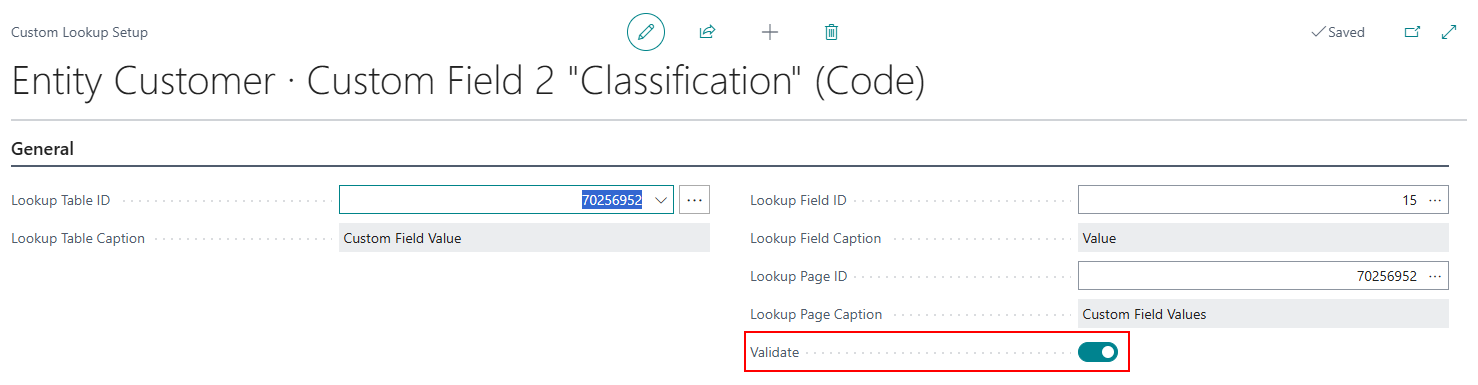
A new Validate setting has been added to the Custom Lookup Setup page for custom Code fields.
This setting allows you to control whether the values that are entered in the field are validated, i.e., whether a check should be performed that entered values are one of the valid values.
DateTime Filter Tokens for Calculation Filters
New DateTime filter tokens have been introduced that can be used to filter on DateTime fields.
For example, you could enter the following filter string to filter a DateTime field:
DATE_STARTOFYEAR TIME_STARTOFDAY..WORKDATE NOW
which translates to "Any date/time between the start of the current year up until now (based on the user's work date)".
For more information, please see the Calculations - Filter Set section of the user manual.
Other changes in 1.86.0.0
-
Fixed: Change the primary key fields (e.g., ID) of a custom field or role center tile would not update the underlying:
- Custom Lookup Setup records
- Field Setup records
- Conditional Style records
(Technical description: Fixed missing
OnRenamelogic) -
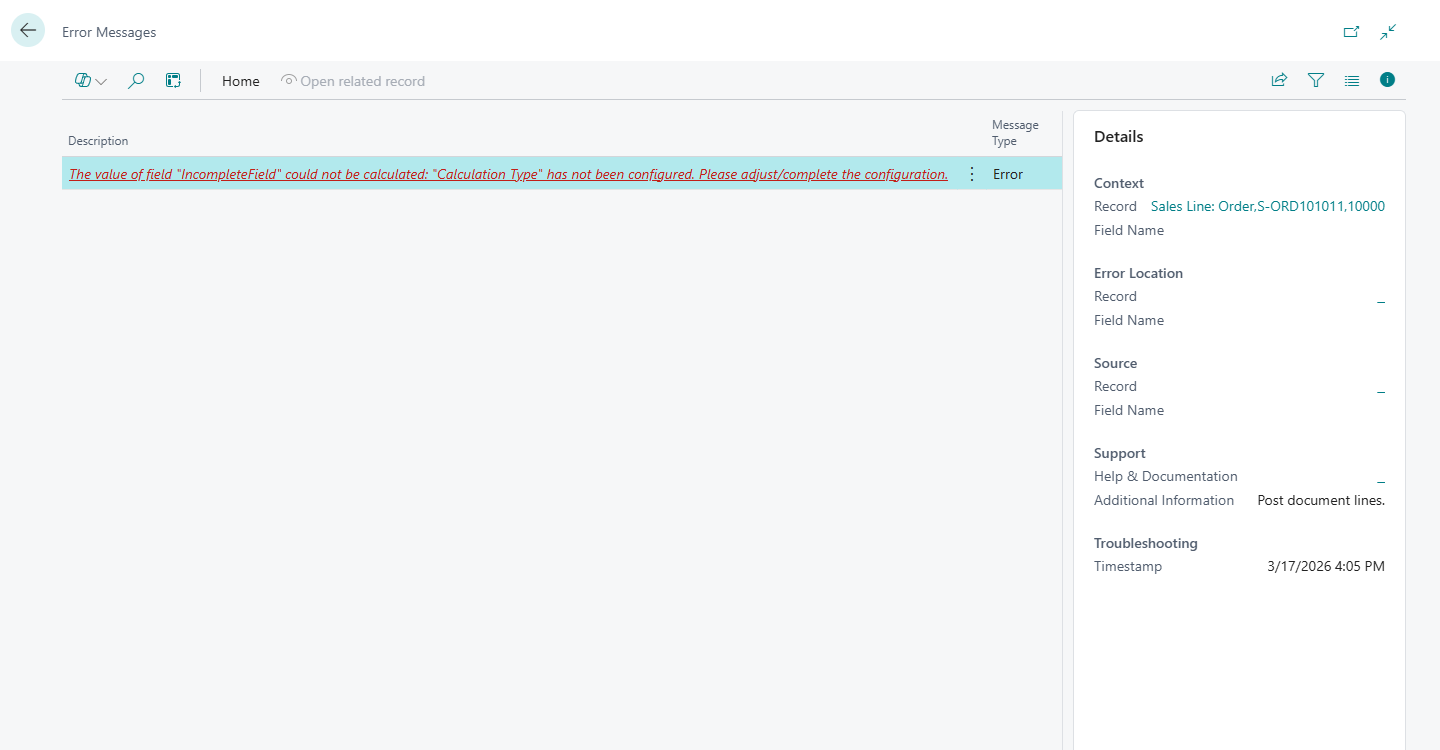
Better error message when users forget to complete the setup of a calculated field on the Sales Line table and then for example try to post a sales order.
-
Allow larger number of Decimal places for Constant Value (Decimal) setting for subcalculations.
Details: Previously, the setting didn't have the
DecimalPlacesproperty explicitly specified, which resulted in that the BC default is used (i.e.,0:2). This effectively meant that the UI wouldn't allow you enter a value with more than 2 decimal places. This has been changed so that the maximum number of decimal places that BC supports for storage can be used (which is 18).
-
When you delete a custom field that has values in posted table records, it is now possible to clear their values.
- Fix for: "Get Receipt" / "Get Shipment" / "Get Return Receipt" / "Get Return Shipment" takes custom field values from posted line instead of original document
1.84.0.0 2026-03-16
Custom Headlines
With the Custom Tiles & Calculated Values product it is now possible to configure custom headlines on Business Central role centers that can be targeted at specific users/user groups and specific dates/times.
You can have custom messages with placeholder values that are substituted by a custom-defined calculated value (which utilizes the same calculation logic that is also used by Role Center Tiles).
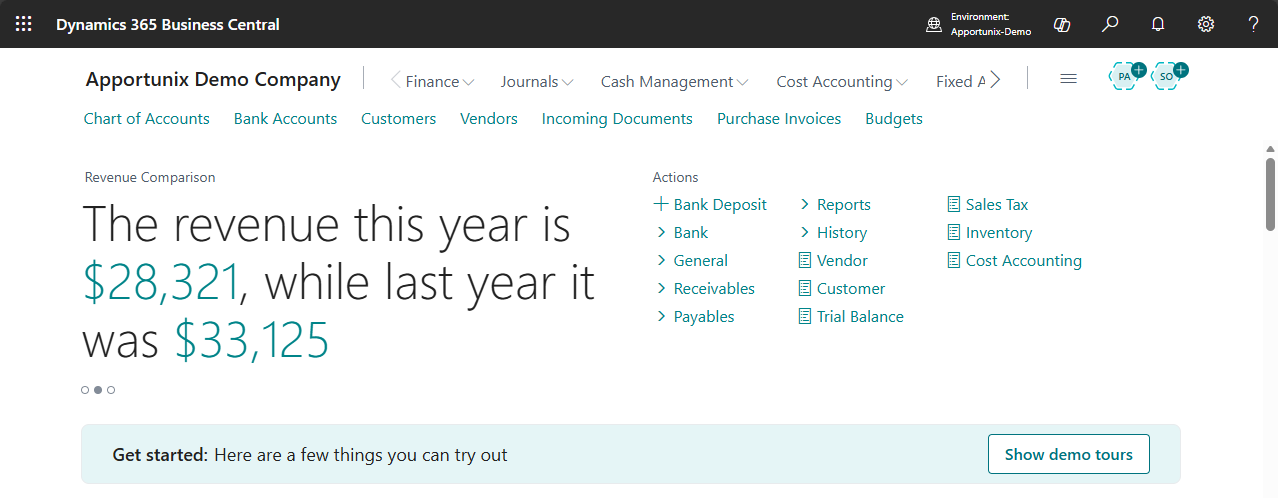
For more detailed information about this new feature, please see the Headlines section in the user manual.
Other changes in 1.84.0.0
-
Possibility to import and export custom field definitions, role center tile definitions, and headline definitions via the Custom Fields Setup page.
See the Export/Import section for more information.
-
"Get Receipt" / "Get Shipment" / "Get Return Receipt" / "Get Return Shipment" takes custom field values from posted line instead of original document
- Automatically transfer calculated field values from non-posted documents to normal field values of posted documents (e.g., Sales Line to (Posted) Sales Invoice Line)
- Possibility to filter on a flowfield in the calculations used by custom tiles and calculated custom fields
1.82.0.0 2026-02-09
Composite Calculations
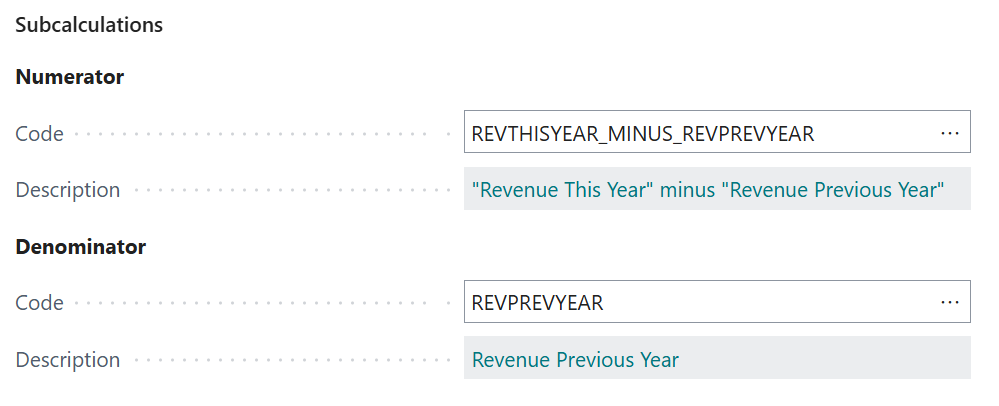
A major functionality update to the Custom Tiles & Calculated Values functionality is now available. It is now possible to configure composite calculations which use Subcalculations to calculate the end-result.
The new supported composite calculation types are the following:
| Calculation Type | Description |
|---|---|
| Addition | Adds the numeric values resulting from 2 subcalculations. |
| Subtraction | Subtracts the numeric value resulting from one subcalculation from the numeric value resulting from another. |
| Division | Divides a numeric value from one subcalculation by a numeric value from another subcalculation. |
| Multiplication | Multiplies a numeric value from one subcalculation by a numeric value from another subcalculation. |
| Comparison | Compares two values (resulting from subcalculations) to one another to yield a boolean result value. |
| Conditional | Calculates one of two subcalculations depending on a condition (whose value is calculated by a boolean subcalculation) |
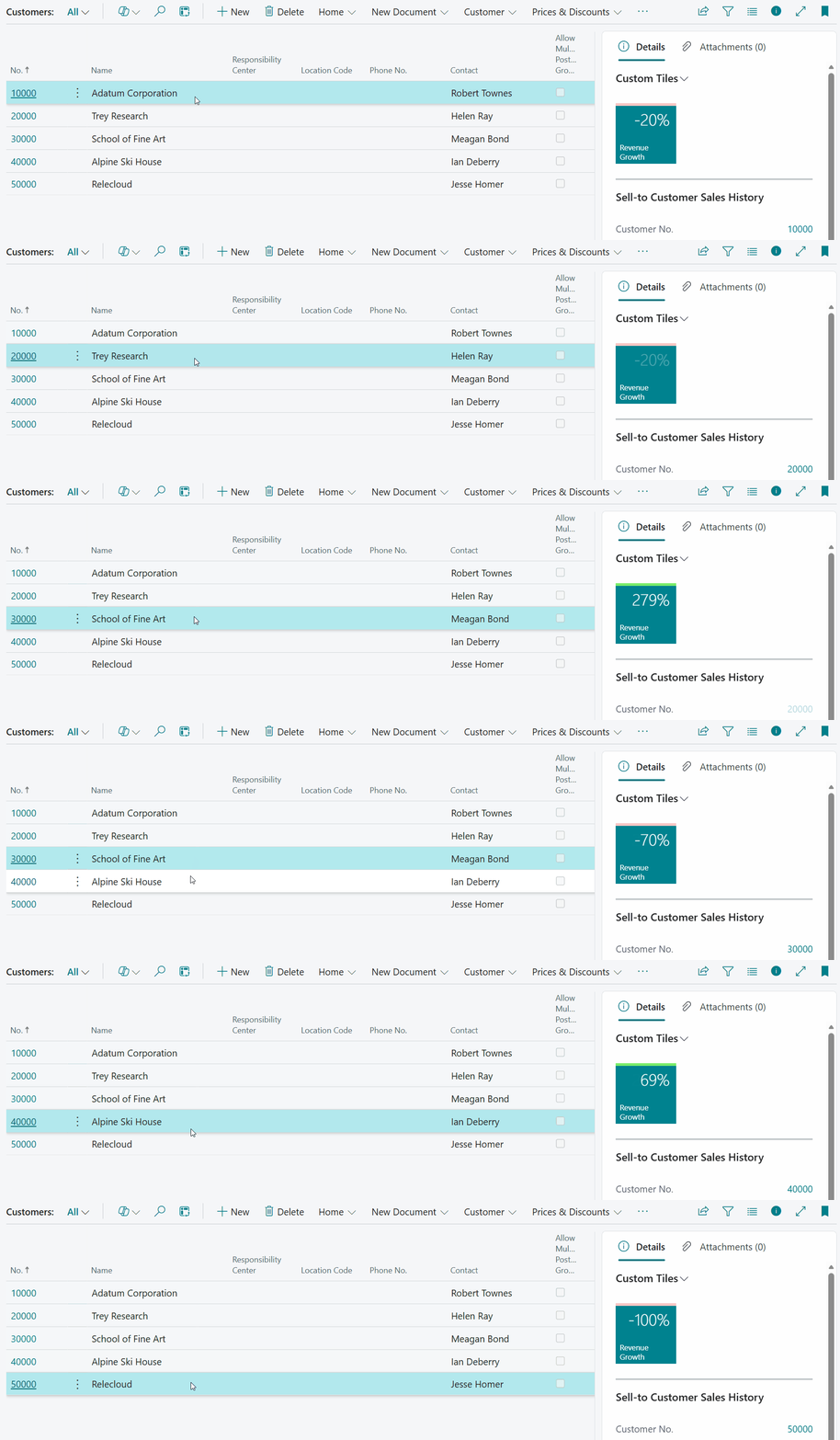
With these new configuration capabilities you can compose advanced calculations, e.g., adding a "Revenue Growth" tile on the Customer List page or on your rolecenter(s).
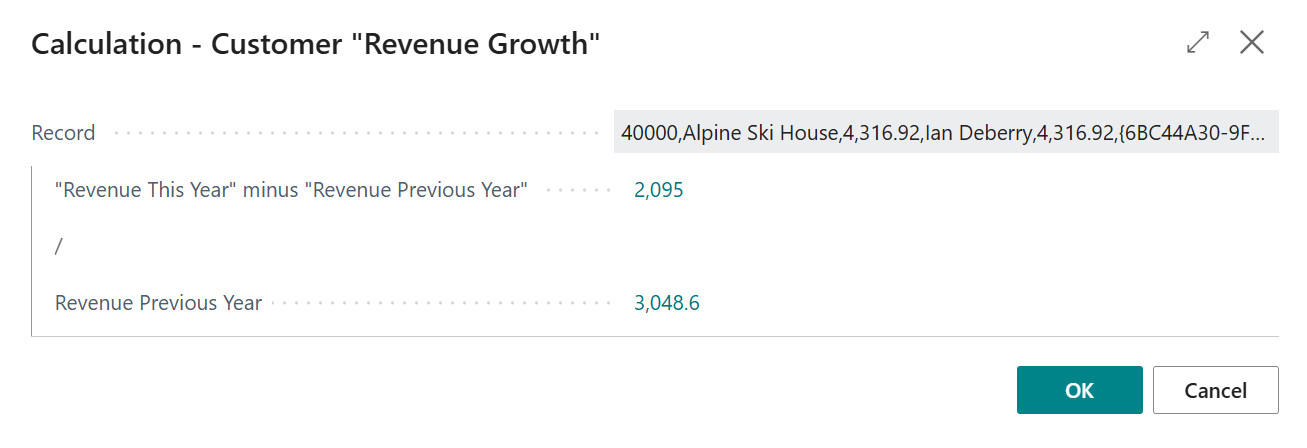
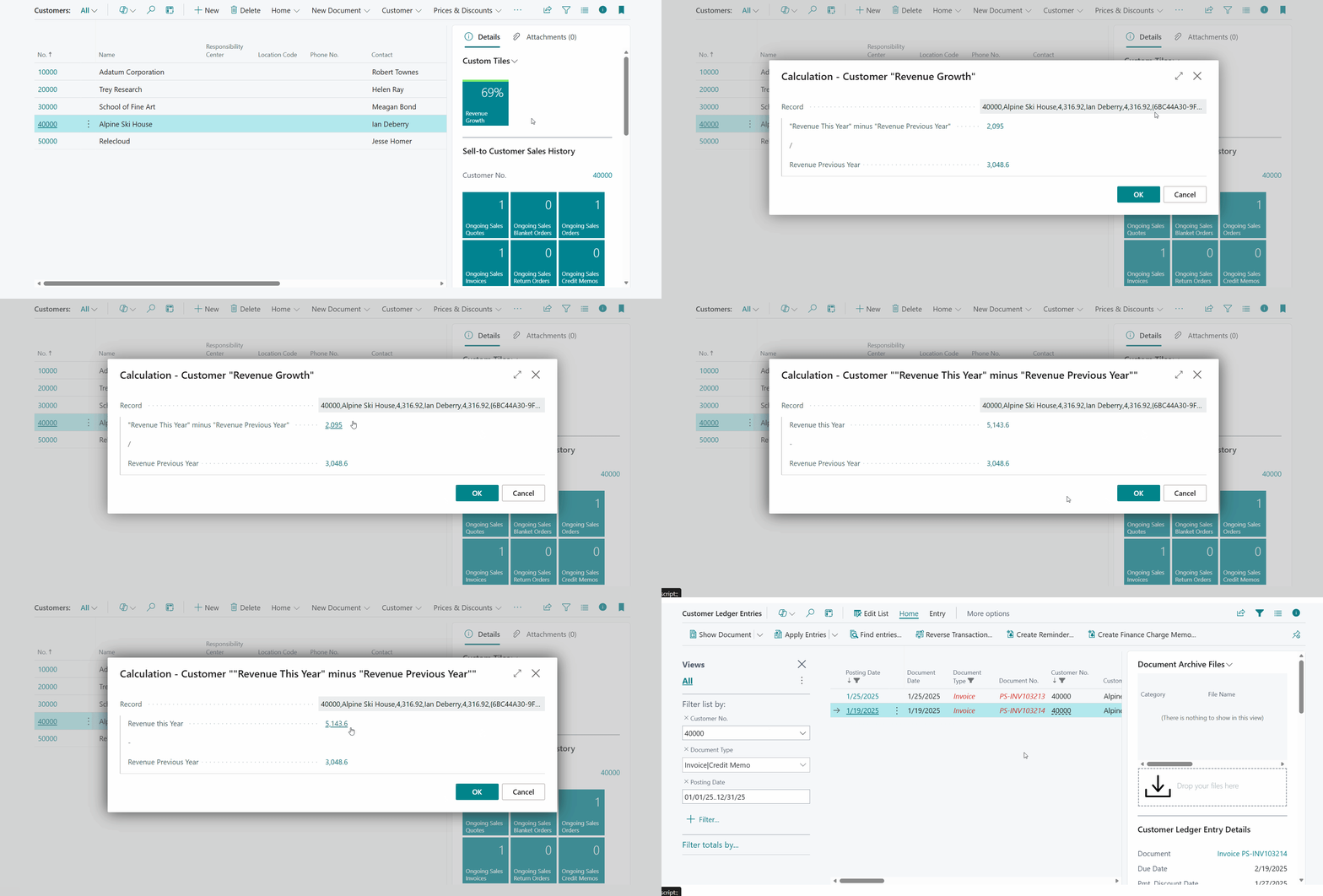
Note that when you click/drill-down on a composite calculation field value, a Composite Drill-Down Dialog will open where you can get more insights into how the calculation is performed and its corresponding subcalculation result values.
Here is a small demonstration of what happens when you click on a field/tile based on a composite calculation:
1.80.0.0 2025-12-02
- Misc. maintenance + build fixes
- Option to inherit/propagate custom field values on contacts of type Person from contact of type Company
1.78.2.0 2025-11-19
Fixed an issue with the captions of the custom fields when using the fields in the filtering options in BC
1.78.0.0 2025-11-13
Added ContextSensitiveHelpPage properties for new page and pageextension objects which helps users to navigate to relevant documentation based on which page they currently have open.
1.76.4.0 2025-10-28
Fixed an issue where the underlying table record for the Custom Tiles rolecenter cardpart would not be properly initialized, which would lead to tile values not getting properly updated on role centers.
1.76.2.0 2025-10-20
Updated initialization logic for Select Custom Fields action of the Apportunix Document Creator Dataset Extensions feature.
1.76.0.0 2025-10-17
Requires Business Central 25.0
Custom Tiles & Calculated Values
A major functionality update to the Calculated Values functionality is now available. The product/subscription has been rebranded from Calculated Values to Custom Tiles & Calculated Values.
Custom Tiles on Role Center Pages
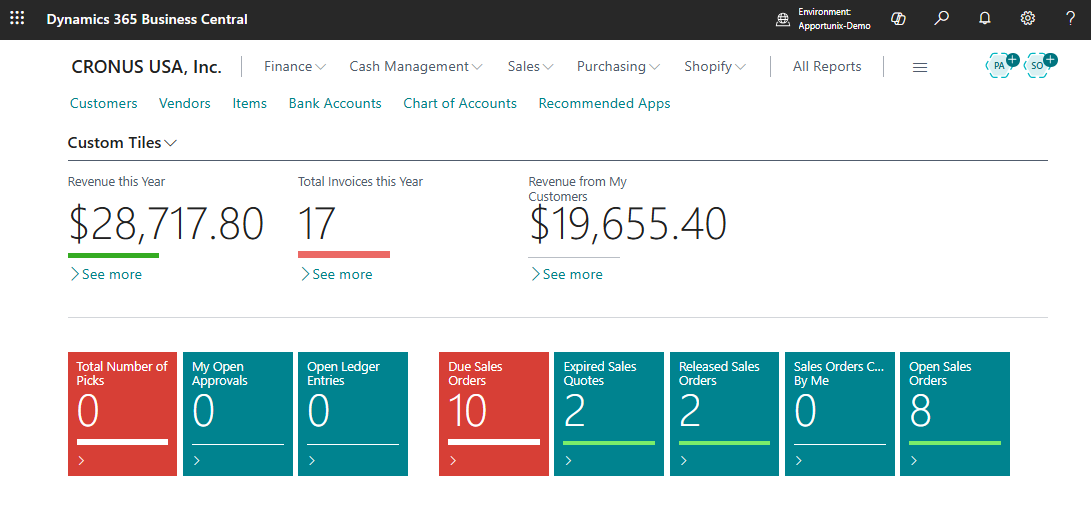
Using the Custom Role Center Tile Definitions page, you can now configure custom tiles for all default Business Central role center pages with custom-defined calculations.
For detailed documentation, please see the Role Center Tiles section of the user manual.
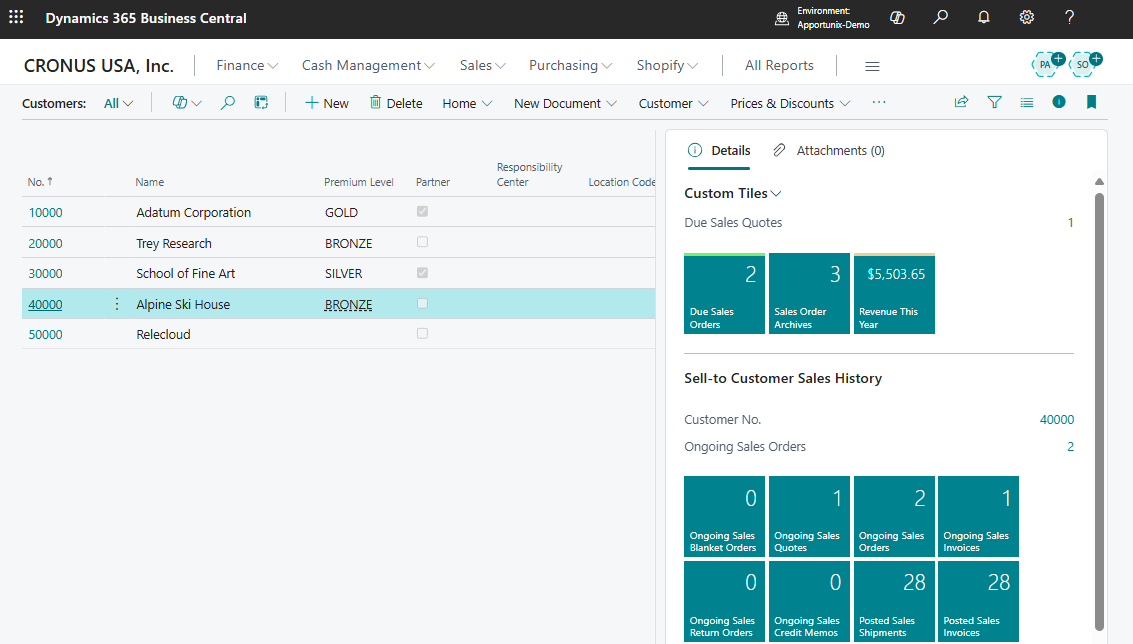
Custom Tiles FactBox
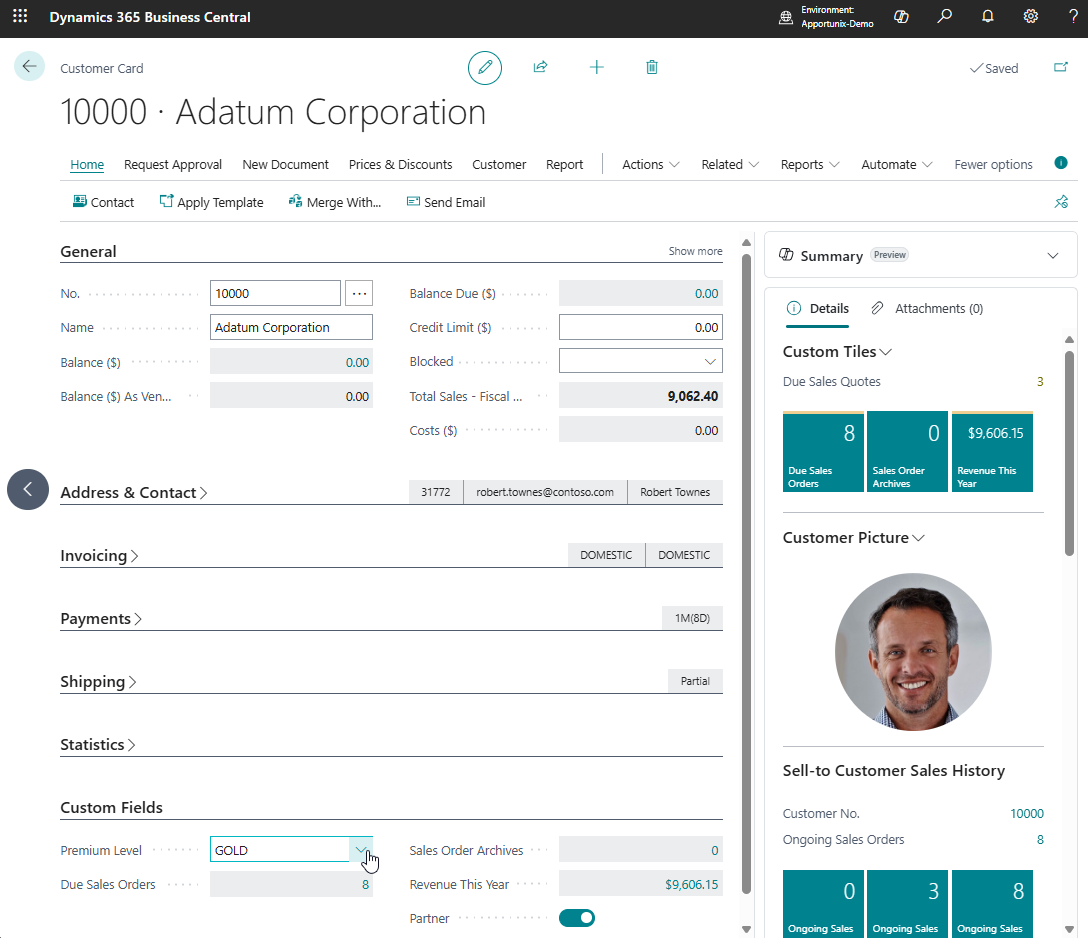
All entities supported by Custom Fields can now also show custom calculated fields with one of the following display types:
| Display Type | Description |
|---|---|
| Page Field | The custom field is shown on the card page as a field. |
| FactBox Field | The custom field is shown in the Custom Tiles factbox as a factbox field. |
| Tile | The custom field is shown in the Custom Tiles factbox as a tile/cue. |
| Page Field and Tile | The custom field is shown in the Custom Tiles factbox on the card and/or list page as a tile and on the card page as a field. |
Background Calculation
Custom calculated fields and tiles are calculated in the background, which brings the following benefits:
- If you have custom calculated field values that take a longer time to calculate, then you do not need to wait for the calculation(s) to finish before you can continue. When the background calculation is finished the fields/tiles are updated automatically.
- If an error occurs in the calculation of a custom calculated field, then this does not block/bother you from continueing to work in Business Central.
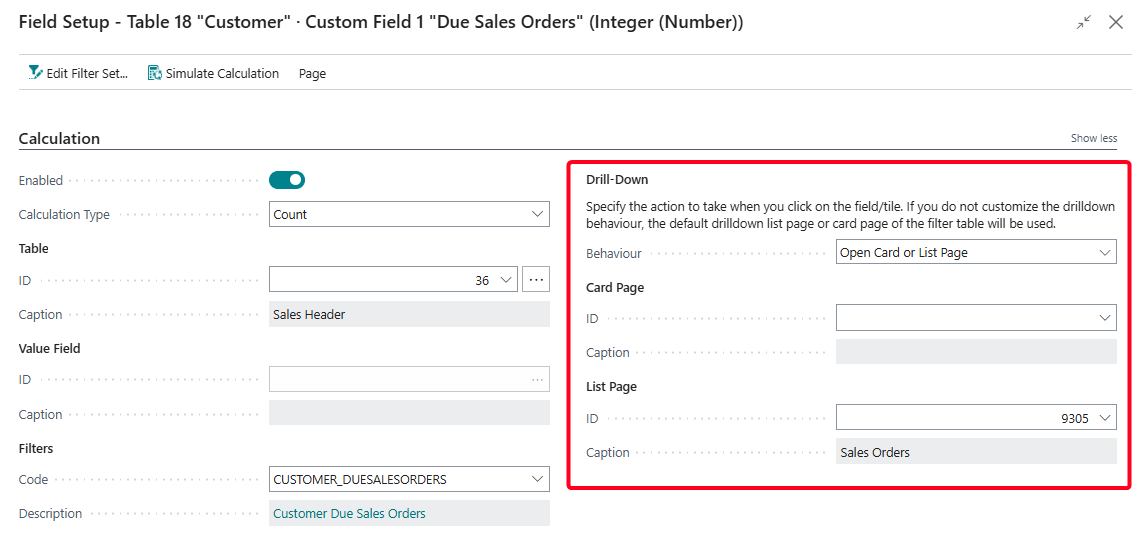
Customize Field/Tile Drill-Down
You can now customize the Drill-Down of custom calculated fields/tiles.
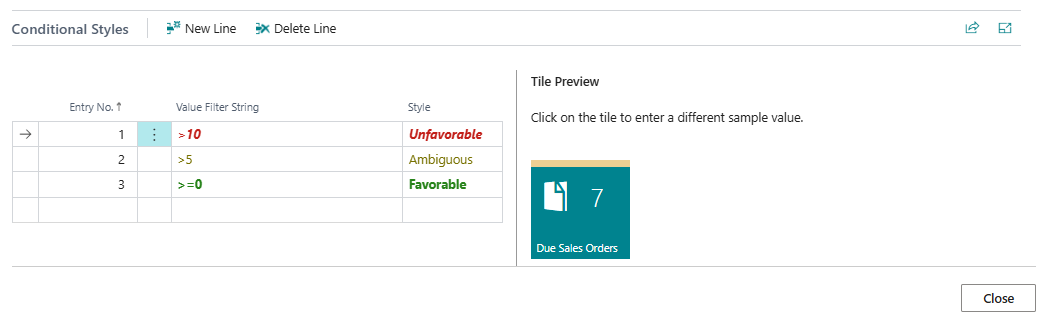
Conditional Styling/Colors
You can now change the color of tiles/field values when they meet certain filter conditions using Conditional Styles configurations.
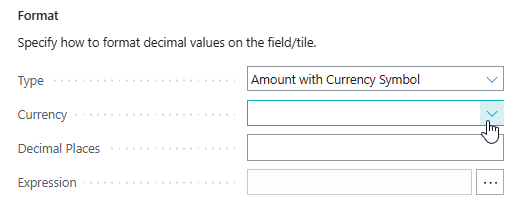
Customize Decimal Formatting
You can now customize the Decimal Formatting of custom calculated fields/tiles.
Negate Value
For Boolean, Decimal and Integer (Number) fields you can negate/invert the calculation result value by enabling the Negate Value setting on the Field Setup page.

1.74.0.0 2025-09-08
-
- Misc. maintenance + build fixes
1.72.0.0 2025-05-12
- Fix: Calculation Types would not load correctly for 'composite' entity types
1.70.0.0 2025-04-14
- Fix issue opening page when Calculated Field configuration is complete
1.68.0.0 2025-03-14
Custom Fields - Calculated Values
With the new Custom Fields - Calculated Values product it is possible to define custom fields that can perform a custom-defined calculation (e.g., a count, sum, average, etc.) and show the output of those calculations on your pages in Business Central.
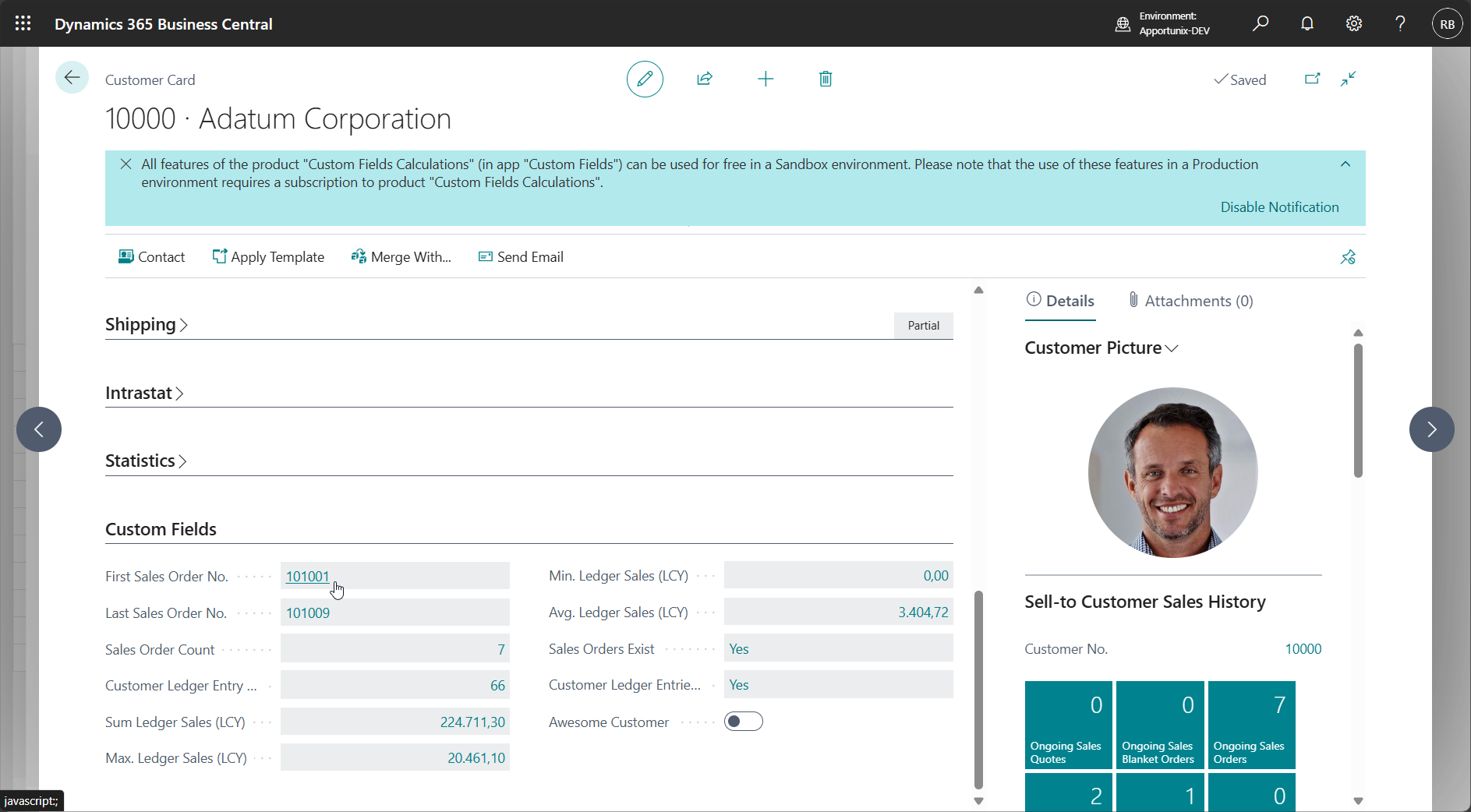
For detailed documentation on this new product/feature set, please see the new Calculations section of the manual.
Misc. Changes in 1.68.0.0
- Changed the captions of project-related entities from Job to Project/Job.
- Changed the captions of the Copy to settings on the Custom Fields Definitions page to show the fully written name of the entities (e.g., Copy to Sales Header instead of Copy to S.Header).
- Changed the captions of the Integer datatype to Integer (Number) and the Boolean datatype to Boolean (Checkbox)
- Added Data Captions to various setup pages to better show the context, i.e., the name of the entity, field number and data type of the field to which the configurations relate.
- Added context-sensitive help to various setup pages to easily navigate to the most-relevant section of the user manual based on the open page.
- Misc. maintenance + new usage telemetry.
1.66.0.0 2024-11-25
- Help URLs updated
1.64.0.0 2024-09-30
- Removed reference to user groups from setup wizard
1.62.0.0 2024-08-05
- Added Pro feature: Custom Fields for Production BOM & Production BOM Line
1.60.0.0 2024-07-08
- Implemented vNext preparations
- Obsoleted the User Groups action on the Custom Fields Setup Wizard page. The action will be removed with the release of Business Central 25.0.0.0.
1.58.0.0 2024-06-10
Copy to Sales Line (from Sales Header)
Added Pro feature: Copy Sales header values to Sales line values
See Copy to Sales Line (from Sales Header).
1.56.0.0 2024-05-10
- Do no overwrite custom field values in Quote-to-Order conversion
- Restored Visibility of Custom Fields pages in free subscription
1.54.0.0 2024-04-12
- Improved Custom Fields page Visibility Setup by adding Minimum Subscription indicator
1.52.0.0 2024-03-15
- Added Pro feature: APIs for all tables where Custom Fields are utilized, with the Custom Fields fully exposed.
1.50.0.0 2024-01-18
- When Custom Fields were set up to be transferred from Customer/Vendor to the Sales/Purchase document header then the field values would not directly get initialized when you would invoke the New document type action on the Customer/Vendor card page, but only after the document header is actually inserted. This has been fixed so that the field values are already copied in this scenario even before the document header record is inserted.
1.48.0.0 2024-01-10
- Fixed default caption of Text 6 to Text 10 Custom Fields.
- Removed Custom Fields Pro subscription checks for Copy From feature.
- Misc. maintenance (resolve info diagnostics)
1.46.0.0 2023-12-06
- Add records for pages Service Item List, Service Item Card and Service Items to the Custom Fields Visibility page.
- Make PageID field non-editable on the Custom Fields Visibility page.
- Fix visibility logic of custom fields on Custom Fields Pro list pages.
- Fix in event subscribers for the Copy From feature implementation to avoid potential (rare) error from failing Contact.Get/Customer.Get/Vendor.Get calls
1.44.0.0 2023-11-22
- Added Custom Fields on all pages + set up page Custom Fields Visibility
- Add user Permission Set setup to guided setup, and automatically start guided setup after install
1.42.0.0 2023-08-29
- Added action to clear Custom Field values on delete of Custom Field Definition
1.40.0.0 2023-08-04
- Added permission sets for manager and user
1.38.0.0 2023-06-29
- Removed Russian translation from Custom Fields
- Added Pro feature: Transfer Custom Fields to Sales & Purchase archives
- Added Pro feature: Custom Fields on Job Task entities
- Change Entity selection in Custom Fields Definitions to enum and updated sorting
1.36.0.0 2023-04-21
- Custom Fields of type "Code" support Custom Field Value tablerelation and custom lookups side-by-side.
1.34.0.0 2023-03-01
Custom Fields - Relations
Added Custom Fields - Relations product:
- Added Relations feature: Create your own Custom Lookup fields to other BC tables
1.32.0.0 2023-09-06
- Implemented preparations for vNext builds.
1.30.0.0 2022-02-03
- Custom Fields on Tracking Specification (Serial/Lot No. Information)
- Added (setup) page(s) to Apportunix Role Center
- Add setup page(s) to manual setup
1.28.0.0 2022-01-26
- Multi-line edit available on list pages
- Fix edit text field in Job Planning Line after transfer from Item
- Add tiles and actions to the Apportunix role center
1.26.0.0 2021-11-19
- Show notification or message to inform user to restart session(s) after adding custom fields to apply translations
- Text fields displayed as single line in page and list page. Edit-button for multi-line included on pages
1.24.0.0 2021-08-30
- Added Pro feature: Custom Fields on Job entities
- Added Pro feature: Custom Fields on Production entities
- Added Pro feature: Custom Fields on Fixed Asset entities
1.22.0.0 2021-07-19
- Automatically request to create new fields when enabling sync.
- Add telemetry to Azure Application Insights
- Fix: Lookup on Service Item did not show values.
- Set default captions for Custom Fields to “Apportunix
”
1.20.0.0 2021-04-14
- Updated Apportunix Custom Fields full permission set
1.18.0.0 2021-03-08
Custom Fields Pro
-
Added Custom Fields Pro product:
- Pro feature: 60 Custom Fields on existing entities (10 per data type)
- Pro feature: Custom Fields on Service entities
Misc. Changes in 1.18.0.0
- Added DataCaption (Expression) to Custom Field Values and Custom Field Translations pages
- Added Russian translation
1.12.0.0 2020-02-24
- Fixed wrong error message on validate Copy to S. Line for Item
1.10.0.0 2020-01-30
- Added support multiple languages
- Added Canadian translation
- Fixes in Dutch translations
- Fixed transfer of Custom Field when creating a document directly from a Customer
1.0.0.0 2019-11-01
- Initial version